plain text power moves

Many a systems engineer or systems administrator have touted the innumerable benefits of moving beyond the visuals of graphical user interfaces to the time-honored activity of entering text at a command line interface. I'm here to talk about plain text power moves, but not in that sense. I want to talk about a few of my favorite daily tools that I rely upon as a systems engineer but don't often think much about, and how they make a difference.
markdown
Markdown is a lightweight markup language that allows you to apply formatting to plain text using simple, unobtrusive symbols, without your fingers ever leaving the keyboard. Unlike proprietary word processors that wrap what you type in binary files or compressed archives of XML files, Markdown is just plain text that remains perfectly readable in a terminal, a code editor, or a web browser. It is richly featured including inline formatting, tables, hyperlinking, code blocks and more.
# Heading Level 1
Regular text and a [hyperlink to Google](https://google.com/)!

## Heading Level 2
**Bold text** next to some *italicized text* as well as some _underlined text_.
Maybe some...
  - Bulleted text?

Or perhaps even some...
  1. Numbered text?

### Heading Level 3
Tables!
| Column 1 | Column 2 |
| -------- | -------- |
| Value A  | Value B  |

#### Heading 4
Code blocks!
```powershell
Verb-Noun -Parameter Value
```

> And don't forget leaving comments...
Many systems support Markdown formatting, which makes it a great way to transport formatted texted between ecosystems, platforms, and apps. If you've ever browsed a GitHub repository before, you know that Markdown is the go-to markup language for projects around the world. And because it's plain text, it is also able to be version controlled, diffed, etc. And with the advent of large language models (LLMs), Markdown's popularity has only grown. LLMs are great at consuming Markdown input and generating Markdown output!
This ubiquitous markup language is something that is so heavily featured in my daily life, I really don't know what I would do without it. It has quietly become central to a lot of the work that I do. Whether I am working in a code repository, writing documentation, doing project planning, drafting a change request, or chatting with an LLM, or even writing a Teams message, you better believe I'm using Markdown. It absolutely wins a place on my list of plain text power moves.
json
JSON is a lightweight data-interchange format that is easy humans to read and write while being simple for machines to parse and generate as well. This format is built on two structures: a collection of key-pair values, and ordered lists of values.
{
  "hostname": "prod-web-01",
  "uptime_sla": 99.9,
  "roles": ["load_balancer", "api_gateway"],
  "resources": {
    "cpu_cores": 8,
    "memory_gb": 32,
    "storage_gb": 50000
  },
  "active": true,
  "last_backup": "2026-03-11T14:30:00Z"
}
Two of my favorite things about JSON are that it is pretty dang universal; there are so many systems out there that will output or accept input as JSON. So many REST APIs resly on JSON, too!
I suppose the second reason is really more of the first, but that is that PowerShell really likes JSON! ConvertFrom-Json readily takes in JSON and happily converts it to a [PSCustomObject] for easy use in automation:
@"
{
  "hostname": "prod-web-01",
  "uptime_sla": 99.9,
  "roles": ["load_balancer", "api_gateway"],
  "resources": {
    "cpu_cores": 8,
    "memory_gb": 32,
    "storage_gb": 50000
  },
  "active": true,
  "last_backup": "2026-03-11T14:30:00Z"
}
"@ | ConvertFrom-Json

# --- Sample PSCustomObject ---
# hostname    : prod-web-01
# uptime_sla  : 99.9
# roles       : {load_balancer, api_gateway}
# resources   : @{cpu_cores=8; memory_gb=32; storage_gb=50000}
# active      : True
# last_backup : 3/11/2026 2:30:00 PM
Got a project where you're spinning up some new servers and know you'll need to create some host-based firewall rules? You can store those in your project files as JSON and use PowerShell to consume the JSON and create the rules.
Once again, JSON is really just plain text. It is highly portable and able to be version-controlled, diffed, etc. And if you interact with LLMs with any regularity, they're pretty good with JSON, too.
mermaid.js
Visualizing architecture used to mean wrestling with a GUI, dragging boxes, and inevitably ending up with a .png file that was outdated the moment it was exported. Mermaid.js is a JavaScript-based diagramming and charting tool that renders Markdown-inspired definitions to create and modify diagrams dynamically using (you guessed it) plain text.
%% A basic top-down Mermaid diagram
graph TD
    User((User)) --> LB{Load Balancer}
    LB -- Path: /api --> AppServer[App Server]
    LB -- Path: /static --> S3[Storage Bucket]
    AppServer --> DB[(PostgreSQL)]
This code block renders into this diagram:

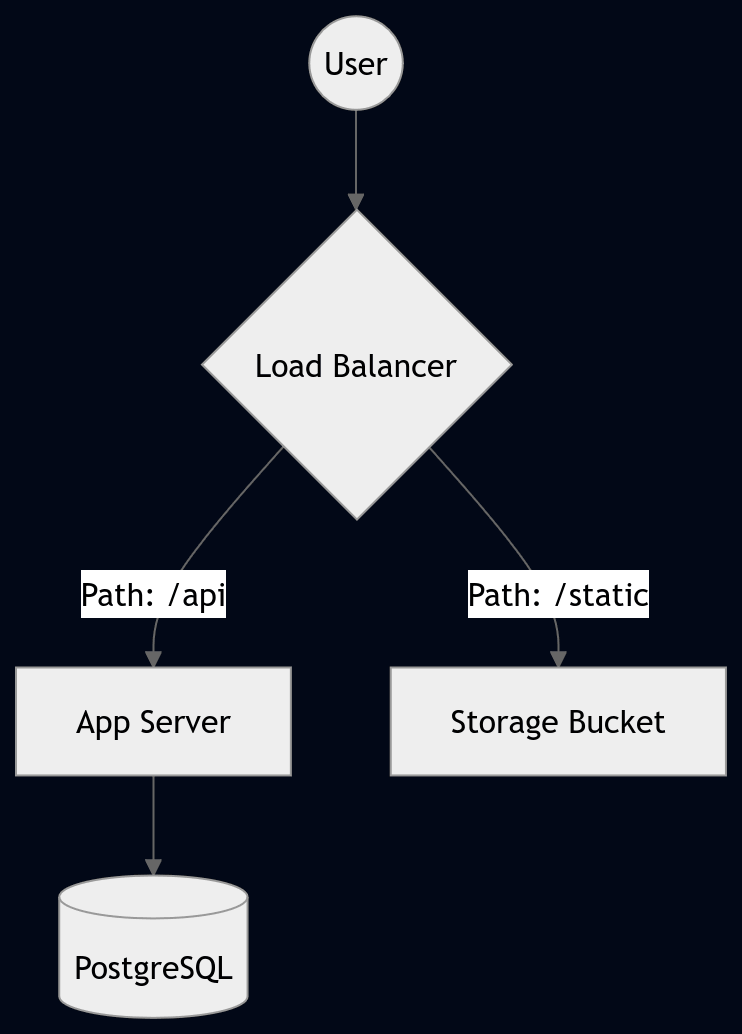
The syntax takes a little learning, but Mermaid is very richly featured and can handle complex architecture diagrams, either with you typing it out in your text editor, or being generated by an LLM. Just as with Markdown and JSON, it's just plain text, so it is portable and can be version-controlled, diffed, etc. This is particularly useful as you can programmatically update diagrams and view changes between them based on version without dragging and dropping shapes around or trying to scan across two copies of something to identify visual differences.
turning the page
To the uninitiated, a formatting syntax, a data-interchange format, and a diagramming language might seem like a mismatched set of tools. But in the day-to-day life of an IT professional in 2026, they represent the fact that simplicity is a feature in an of itself, rather than a lack of one.
By leaning into these plain text power moves, we aren't just taking notes or drawing boxes; we are creating a better documented, more automated, and easier environment with which to work.
When your documentation, configuration, code, and architecture can all be stored as plain text, they become part of the same ecosystem. They can all be edited using the same text editor, version-controlled in Git, audited via a simple diff, and seamlessly fed into the LLMs many are using more and more to augment their workflows.
These tools are hugely beneficial to me on a daily basis and I've never really stopped to think about the impact that they have on my day-to-day life as a systems engineer. I guess after some thought, I've realized:
There's no shelf life for plain text, and that's a power move.
I in no way used this as an excuse to at least publish something on pckt.blog...
I don't know that I'll actually post much here. I really like this site and standard and want to use it, but am quite happy with my blog set up hosted on GitHub Pages (check out https://griff.systems/ for PowerShell posts!).
Maybe this will be reserved for other IT-related ramblings.